Free and open source, for Codex CLI on Mac

Same model. Keep going.

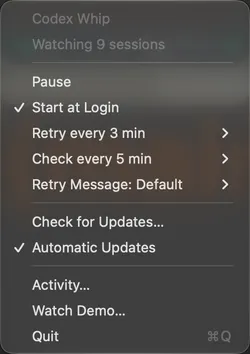
Codex Whip sits in your menu bar. When Codex stops at a capacity error or runs out of quota, it waits, checks and asks the same session to carry on with the model you picked.

Apple silicon · macOS 14 or later · Intel Mac

Codex Whip runs on a Mac. Send this page to yours for later.

Illustrated film · Time compressed

Codex stops. Then it waits for you.

A capacity error ends the turn. Codex suggests another model and goes quiet, all night if nobody is there to answer.

How it works

What Whip does while you sleep

The times come from the film. The waits are the app’s defaults: a retry three minutes after Whip finds an error, and a quota check every five minutes.

0102:15 to 02:18

Capacity errors

Whip finds the error on its next check, waits three minutes, then sends your saved message to the same session. Same model, same reasoning, same permissions.

  1. Capacity error Found on the next check
  2. Retry in 3:00 Waiting the retry interval
  3. Retry sent Saved message, same model

0204:52 to 05:02

Quota renewals

Out of quota, Whip checks Codex every five minutes. Once Codex says your usage is available again, Whip continues the work.

  1. Usage limit reached Waiting for quota
  2. Checked Codex Not available yet
  3. Quota available Confirmed by Codex, retry sent

0306:31 to 06:36

Early resets

Resets don’t always wait for the schedule. Whip’s next check catches an early one, because it reads your quota straight from Codex.

  1. Usage limit reached Waiting for quota
  2. Quota available Confirmed by Codex
  3. Retry sent Saved message, same model

Whip never switches models, spends reset credits or changes accounts. If Codex can’t confirm your quota, or the account changes, the retry waits.

Privacy

Everything stays on your Mac

Whip talks to the Codex daemon already running on your Mac and keeps its settings and history in a folder in your account. No account, no analytics, no servers of ours.

  • Its only internet traffic is a signed update check on GitHub once a day, and the update itself when you install one.
  • To keep a quota retry on the right account, it stores a one-way hash of your Codex account ID, never your name or email.
  • The source is public, so you can read every line yourself.

Install

Running in three steps

  1. DownloadGet the DMG for your Mac and drag Codex Whip into Applications.
  2. Open itWhip appears in your menu bar. Choose Start at Login to keep it there.
  3. Keep using CodexRun Codex CLI as usual. Whip watches the sessions Codex has loaded.

macOS 14 or later · Free · MIT License

Questions

Is it really free?

Yes. Codex Whip is free and open source under the MIT License, and the code is on GitHub.

Will it switch me to another model?

No. Every retry keeps your model, reasoning effort, permissions and service tier.

What does it actually send?

One message, to the same session: your saved retry message. The default is ‘Keep using the selected model. Continue the unfinished work.’

Does it spend reset credits or use another account?

Never. A quota retry waits until Codex says usage is available for the same account. If the account changes, the retry stays on hold.

Does it watch posts about early resets?

No. It checks Codex’s own quota status, so an early reset shows up on its next check.

When does a retry count as a success?

After two minutes of uninterrupted work, or a turn that finishes sooner. The Activity report counts it then.

Which Macs does it run on?

macOS 14 or later, on Apple silicon and Intel.

Is it made by OpenAI?

No. It’s an unofficial companion for Codex CLI. Model availability still depends on OpenAI.

Made by

Hi, I’m turushan

I built Codex Whip for my own long Codex runs. Now it’s free and open source, so it can keep yours going too.

Same model. Keep going.

Free and open source. Ready for your next long run.

Apple silicon · macOS 14 or later · Intel Mac